The Tamil Nadu government has launched the PICME platform to make health services and financial assistance easier for pregnant women. Now, PICME registration is completely online, allowing women to create their PICME RCH ID from home. On this single page, you will find complete and detailed information about PICME login, PICME 3.0, PICME tn gov in login, and all important details related to the maternity assistance scheme.
PICME Login – Online Registration for Pregnant Women & Maternity Benefits
PICME (Pregnancy and Infant Cohort Monitoring & Evaluation) is a Tamil Nadu Government digital system that helps track maternal and child healthcare services and ensures timely benefit delivery.
Use this official access guide to register, log in securely, and manage your PICME details without visiting offices.
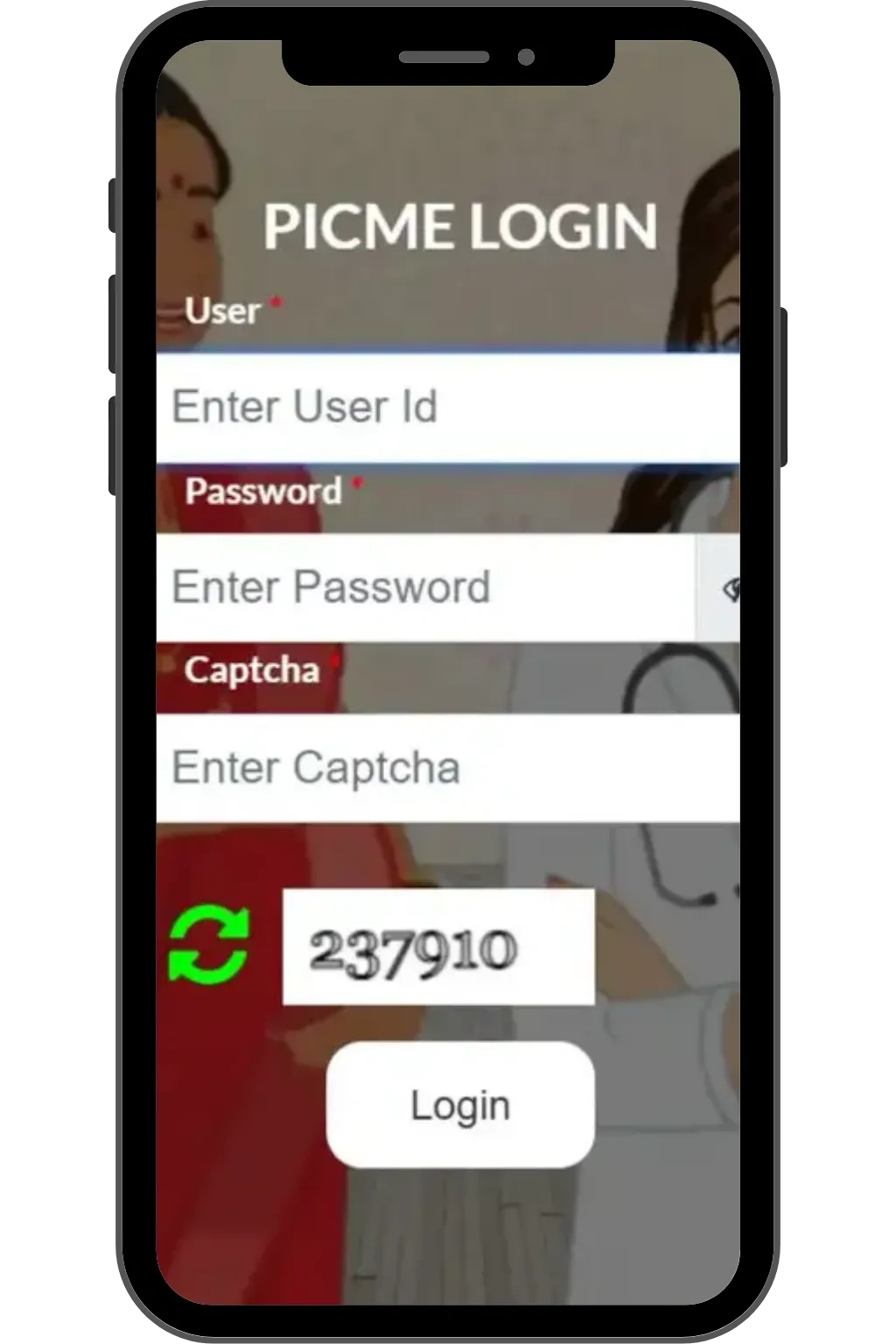
What is PICME?
PICME stands for Pregnancy and Infant Cohort Monitoring and Evaluation. It is a digital health platform launched by the Government of Tamil Nadu to monitor and support the health of pregnant women and newborn babies. The main goal of PICME is to ensure proper medical care, regular health check-ups, and continuous tracking from early pregnancy until after childbirth.
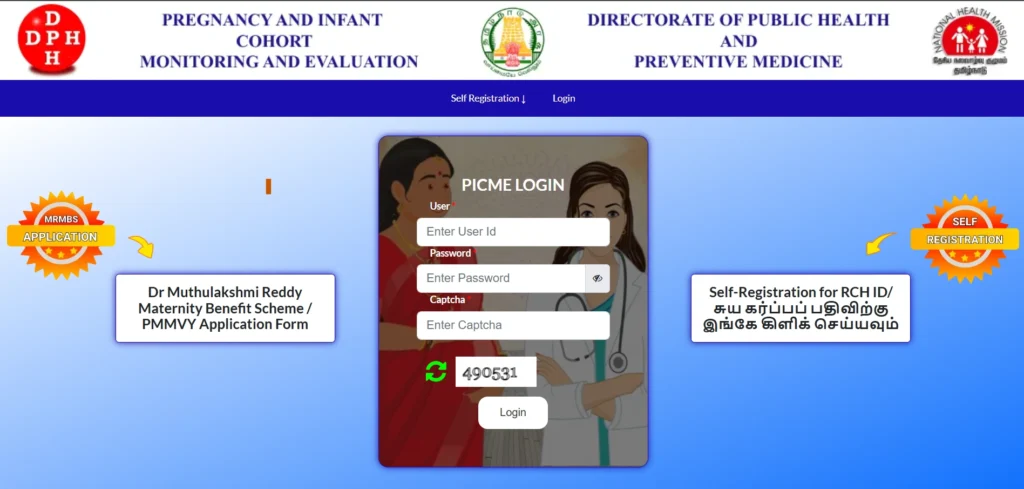
When a woman completes PICME registration, she is issued a unique PICME RCH ID. This RCH ID acts as an official government health identity for the pregnant woman. All medical records, antenatal check-ups, and follow-up services are linked to this single ID, making healthcare services more transparent and efficient.
PICME is also directly connected to government maternity benefit schemes. Without PICME login and a valid PICME RCH ID, pregnant women cannot receive the ₹18,000 maternity assistance provided under state and central government programs. Additionally, the PICME RCH ID is mandatory for applying for a child’s Birth Certificate after delivery. Overall, PICME plays a crucial role in safeguarding the health, financial security, and future well-being of both mother and child in Tamil Nadu.
PICME Portal- Short Overview
| Feature | Details |
|---|---|
| Platform Name | PICME (Pregnancy and Infant Cohort Monitoring and Evaluation) |
| Purpose | Online registration and health monitoring of pregnant women in Tamil Nadu |
| Website | picme.tn.gov.in |
| RCH ID | Unique ID for every pregnant woman, mandatory for health services and maternity benefits |
| Registration | Self-registration via PICME portal or through local health nurse |
| PICME 3.0 | Latest version with online login, bank account linking, and fast approval |
| Eligibility | Pregnant women aged 19+ residing in Tamil Nadu, Aadhaar linked mobile number required |
| Required Documents | Aadhaar Card, Address Proof (Ration Card/Passport/Driving License/EB Bill), Mobile number |
| Benefits | ₹18,000 maternity assistance (₹14,000 cash + ₹4,000 nutrition support), health monitoring, Birth Certificate facilitation |
| Cash Installments | 4th month ₹4,000, Delivery month ₹4,000, 4 months after birth ₹6,000 |
| Nutrition Support | 4th month ₹2,000, 7th month ₹2,000 |
| PICME Login | Access personal profile, registration status, update bank details |
| Application Status | Check PICME registration Statu online via portal |
Why is PICME RCH ID Important?
PICME RCH ID is not just a number; it is the official government health record of a pregnant woman. Without this ID, many essential maternity and healthcare services cannot be accessed.
Main uses of PICME RCH ID:
- To receive ₹18,000 maternity assistance
- For regular check-ups at the Primary Health Center (PHC)
- For proper medical monitoring during pregnancy
- To obtain the baby’s Birth Certificate after delivery
- To check PICME registration status
PICME Registration Eligibility Criteria (Detailed Explanation)
The table below explains the eligibility criteria for PICME registration in detail. These conditions are mandatory for pregnant women who want to generate a PICME RCH ID and receive maternity benefits under Tamil Nadu government schemes.
| Eligibility Condition | Detailed Explanation |
|---|---|
| Minimum age of 19 years | For PICME registration, the pregnant woman must be at least 19 years old. This age requirement ensures compliance with legal and public health guidelines. Applications from women below 19 years of age are not accepted in the PICME system. |
| Pregnancy must be confirmed | PICME registration is allowed only after pregnancy confirmation. This ensures that antenatal care, medical monitoring, and maternal health services are provided accurately from the early stage of pregnancy. |
| Aadhaar card must be linked with mobile number | The PICME login and verification process is completely OTP-based. Therefore, the pregnant woman’s Aadhaar card must be linked to an active mobile number. Without OTP verification, a PICME RCH ID cannot be generated. |
| Resident of Tamil Nadu | PICME is a state-specific program applicable only to pregnant women residing in Tamil Nadu. During registration, address proof is used to verify that the applicant is a permanent or current resident of the state. |
Important Note:
Only women who meet all the above eligibility conditions can successfully complete PICME registration, access PICME login, receive a valid PICME RCH ID, and avail maternity benefits such as the ₹18,000 assistance scheme. These criteria ensure that government support reaches eligible beneficiaries and helps safeguard the health and well-being of both mother and child.
Documents Required for PICME Registration
During PICME registration, the following documents are mandatory:
| Document Name | Description |
|---|---|
| Aadhaar Card of Pregnant Woman | Aadhaar card of the pregnant woman is mandatory for PICME registration |
| Aadhaar Linked Mobile Number | Mobile number must be linked with Aadhaar to receive OTP for verification |
| Address Proof | Any one document: Aadhaar Card, Ration Card, Voter ID, Passport, or EB Bill |
| Scanned Address Proof | Scanned copy of address proof (file size must be less than 50 KB) |
PICME Login – Step by Step Guide
PICME login allows pregnant women to access their profile, track their registration status, and check maternity benefits. Follow these steps:
Step 1: Open PICME Portal
- Visit picme.tn.gov.in
- Go to PICME Login section.
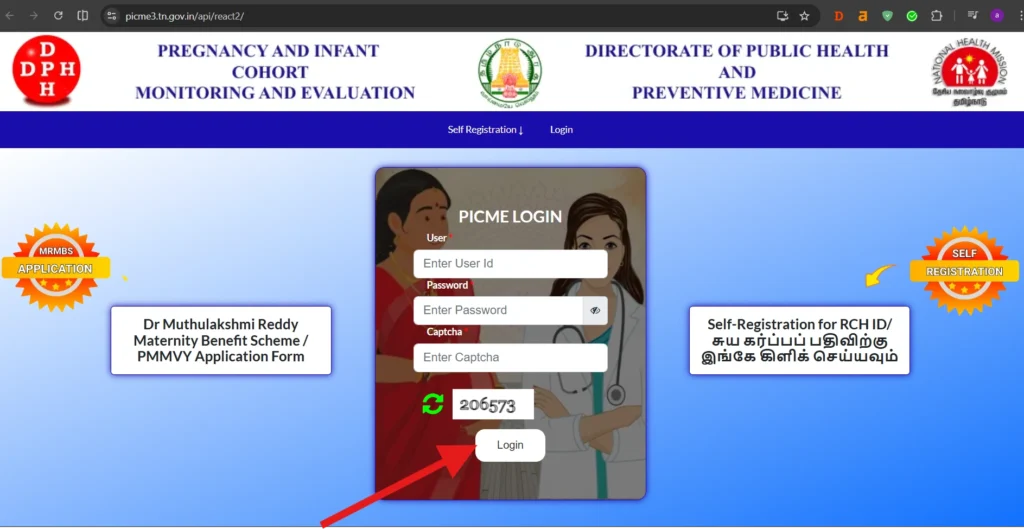
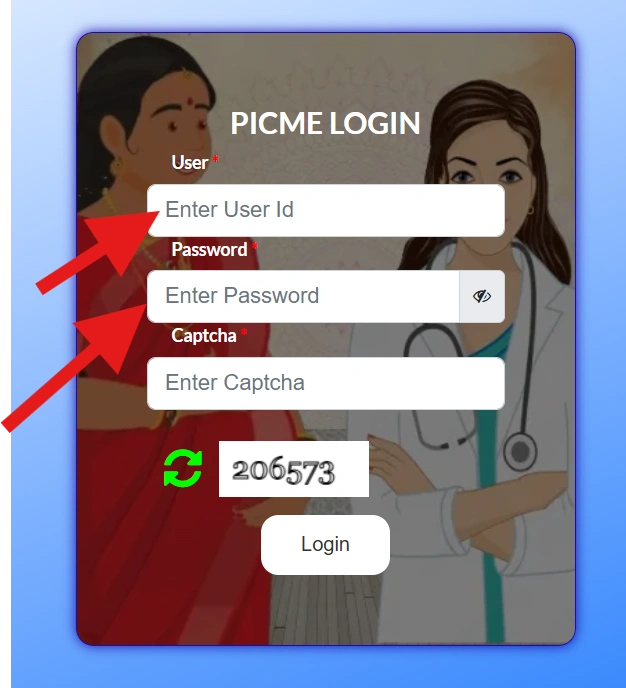
Step 2: Enter RCH ID
- Type your 12-digit PICME RCH ID.
- Double-check for mistakes.
Step 3: OTP Verification
- You will get OTP on your Aadhaar-linked mobile number.
- Enter the OTP to verify your identity.
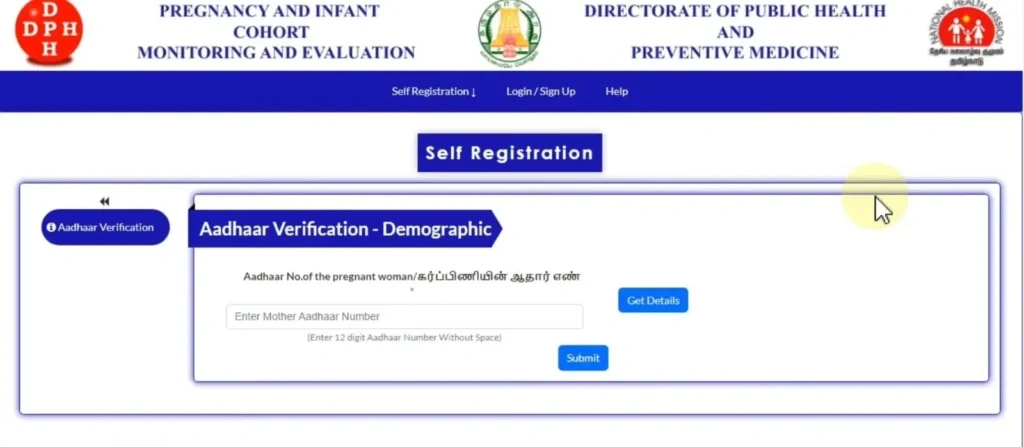
Step 4: Access Dashboard
- After login, view your personal details, pregnancy info, and health records.
- Check PICME registration Statu to see if it is Approved, Pending, or Rejected.
Step 5: Tips for Smooth Login
- Use Aadhaar-linked mobile number.
- Keep your RCH ID safe.
- Use Chrome or Firefox for best experience.
- Don’t share OTP.
✅ Benefits of PICME login:
- Track PICME RCH ID and registration status
- Check maternity benefits under Dr. Muthulakshmi Reddy Maternity Scheme
- Update bank details for direct cash transfer
How do I register for PICME? (Step-by-Step Guide)
Pregnant women in Tamil Nadu can now complete PICME registration online without visiting a health center. By using the official portal picme.tn.gov.in picme, you can generate your PICME RCH ID from home.
Follow the steps below carefully:
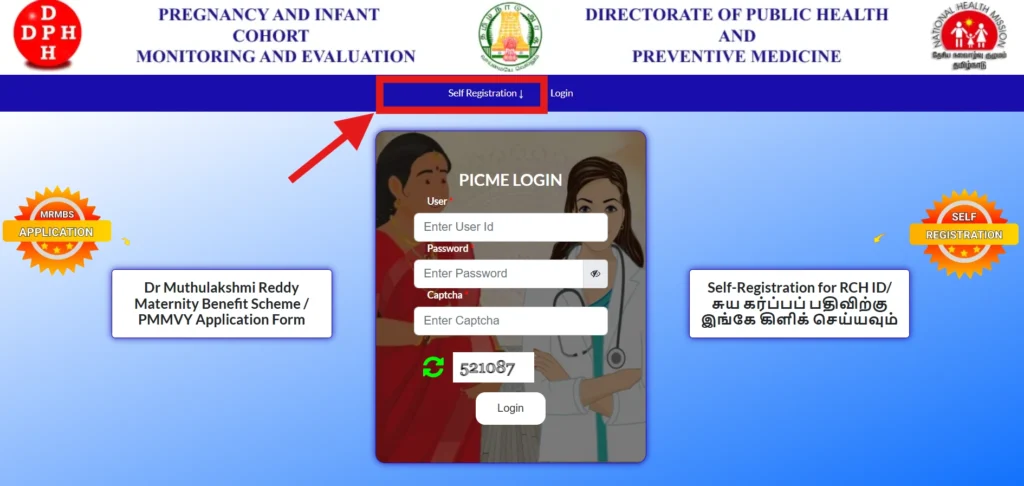
Step 1: Open the Official PICME Portal
Visit the official website of the Tamil Nadu PICME system using a secure browser.
This portal is also known as PICME tn gov in.
Step 2: Select “Generate RCH ID by Yourself”
On the homepage, look for the option labeled “Generate RCH ID by Yourself”.
Click on this option to begin your PICME registration process.
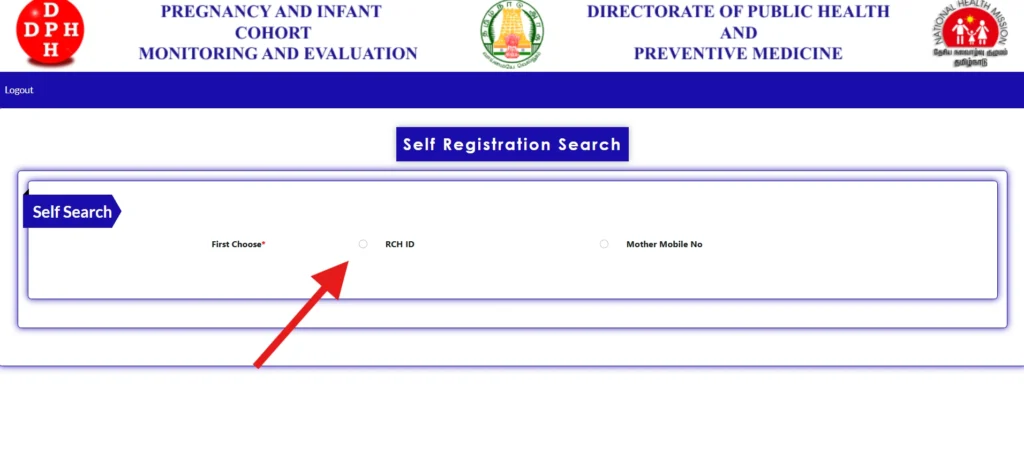
Step 3: Enter Aadhaar Number
Enter the 12-digit Aadhaar Number of the pregnant woman in the given field.
Make sure the Aadhaar number is correct and active.
Step 4: Verify OTP
An OTP (One-Time Password) will be sent to the mobile number linked with the Aadhaar card.
Enter the OTP to complete Aadhaar verification.
Step 5: Fill Personal Details
After OTP verification, enter the required personal information, including:
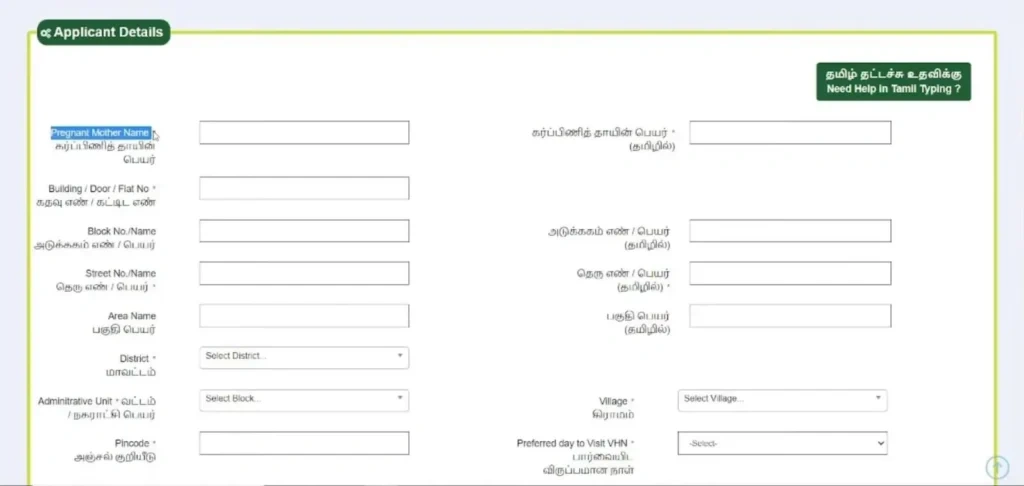
- Full name of the pregnant woman
- Husband’s name
- Age and date of birth
- Pregnancy details
Ensure all information matches the Aadhaar records.
Step 6: Upload Address Proof
Upload a valid address proof document, such as:
- Aadhaar Card
- Ration Card
- Voter ID
- Electricity Bill
The uploaded file should be clear and within the allowed file size limit.
Step 7: Submit the Application
Review all the entered details carefully.
Once verified, click the Submit button to complete the PICME registration.
After Submission – What Happens Next
- Your application is automatically forwarded to the Urban Health Nurse or Village Health Nurse of your area
- The nurse will verify the submitted details
- After successful verification, your PICME RCH ID will be generated
You can later access your details using PICME login and track your PICME registration status online.
PICME 3.0 Registration and ₹18000 Maternity Benefit for Pregnant Women
The Dr. Muthulakshmi Reddy Maternity Benefit Scheme provides a total financial assistance of ₹18,000 for pregnant women in Tamil Nadu. This amount is a combination of State and Central Government Schemes:
| Source | Amount | Description |
|---|---|---|
| Tamil Nadu Government Scheme | ₹14,000 | Cash assistance in 3 installments during and after pregnancy |
| PMMVY (Central Government Scheme) | ₹4,000 | Nutrition support for mother and child |
Cash Installments (₹14,000)
| Installment | Timing | Amount |
|---|---|---|
| 1st Installment | 4th month of pregnancy | ₹4,000 |
| 2nd Installment | After delivery (1st month) | ₹4,000 |
| 3rd Installment | 4 months after delivery | ₹6,000 |
Nutrition Benefit (₹4,000)
| Installment | Timing | Amount |
|---|---|---|
| 1st Installment | 4th month of pregnancy | ₹2,000 |
| 2nd Installment | 7th month of pregnancy | ₹2,000 |
✅ Total Assistance: ₹14,000 (Cash) + ₹4,000 (Nutrition) = ₹18,000
FAQs on PICME and RCH ID
What is the 18,000 pregnancy scheme in Tamil Nadu?
The ₹18,000 pregnancy scheme in Tamil Nadu is called the Dr. Muthulakshmi Reddy Maternity Benefit Scheme. It provides financial support to pregnant women. ₹14,000 is given in cash installments during pregnancy and after childbirth, and ₹4,000 is given as nutrition support. To avail this scheme, every pregnant woman must have a PICME RCH ID and complete her PICME registration.
PICME login Forgot password – What to do?
If you forget your PICME login password, go to the PICME login page at picme.tn.gov.in. Click on the “Forgot Password” option. Enter your PICME User ID or RCH ID and registered mobile number. You will receive an OTP to reset your password and regain access to your account.
PICME Login in tn gov in Login registration
To login for the first time, visit PICME tn gov in. If you are not registered yet, complete PICME registration first to generate your RCH ID. Once you have the RCH ID, use it along with your registered mobile number to PICME login securely.
How to get PICME Login ID and password
Your PICME Login ID is the RCH ID provided after registration. To get it:
- Visit picme.tn.gov.in
- Click “Generate RCH ID by Yourself”
- Enter Aadhaar number and verify OTP
- Fill your personal and address details
Once your registration is verified by the local nurse, you will receive your PICME RCH ID (Login ID). Password will be set during login.
How to create PICME Login ?
To create your PICME login:
- Go to PICME 3.0 login page
- Enter your RCH ID and registered mobile number
- Verify OTP
- Set your password
After this, you can login anytime to check pregnancy benefits, RCH ID details, and maternity scheme status.
What is user ID in PICME Login ?
The User ID in PICME Login is the RCH ID given after completing PICME registration. It is unique for each pregnant woman and is required for accessing maternity benefits, online health monitoring, and scheme status.
How do I reset my password in Picme?
To reset your PICME password:
- Open picme.tn.gov.in login page
- Click Forgot Password
- Enter your RCH ID and registered mobile number
- Verify OTP and create a new password
Now you can login with your new password.
How to check picme number details?
To check your PICME number details:
- Go to PICME login at picme.tn.gov.in
- Enter your RCH ID and password
- Open Profile / Application Status section
Here you can see your registration details, maternity benefit status, and personal information.
How do I get a RCH ID?
To get a RCH ID:
- Visit PICME tn gov in
- Click on “Generate RCH ID by Yourself”
- Enter Aadhaar number and OTP
- Fill in your personal and address details
- Submit the application
After verification by the local nurse, you will receive your RCH ID, which is required for PICME login and maternity benefits.
Conclusion
PICME is a highly important government platform for pregnant women in Tamil Nadu.
If you complete your PICME registration, PICME login, and PICME 3.0 login on time, you can access government health services and financial assistance without any hassle.